A retro game launcher and emulator frontend for PC
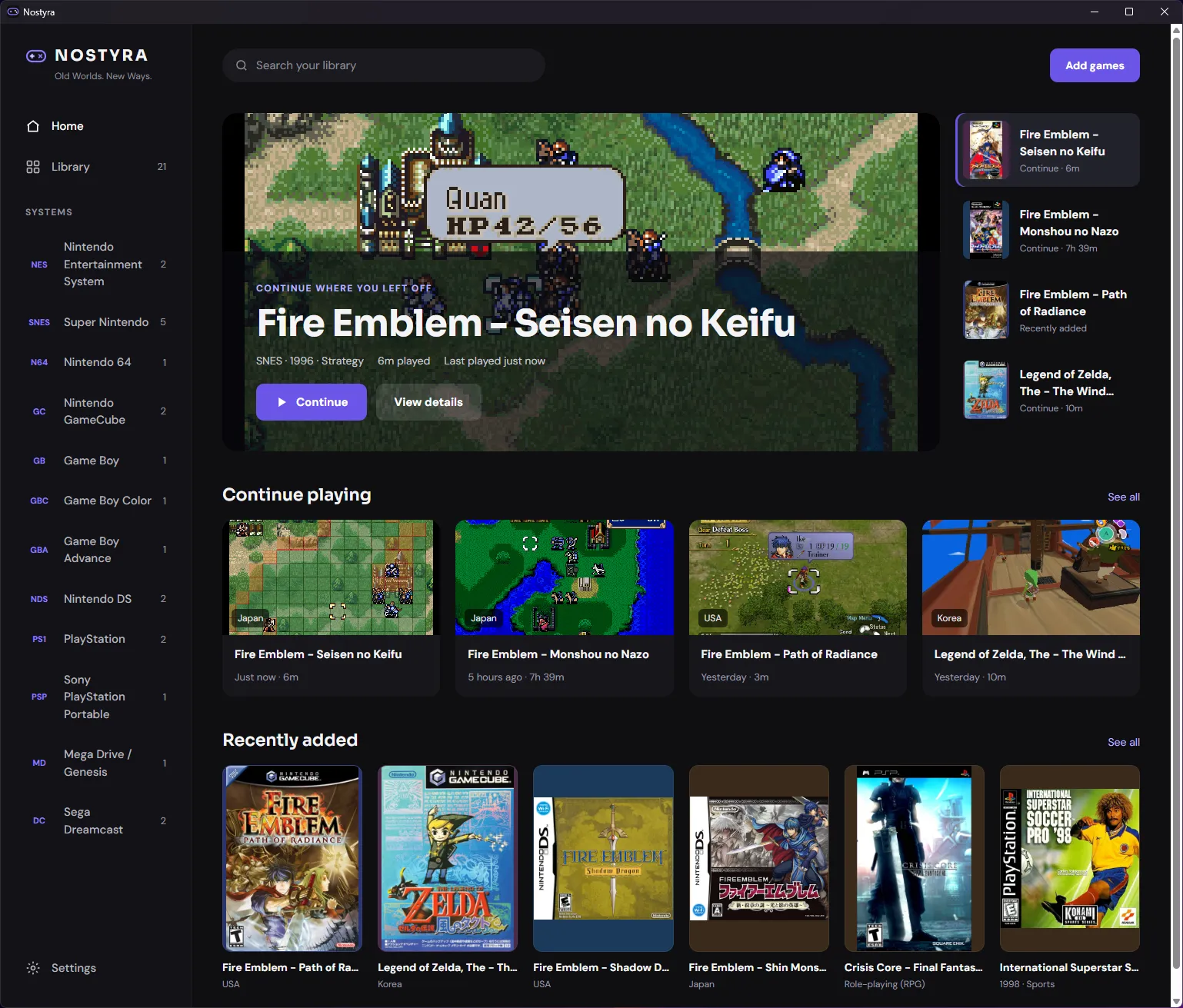
Nostyra lets you play games from 16 classic Nintendo, Sega and Sony systems on a Windows PC. Choose the folder with your ROMs: Nostyra builds a library with cover art and downloads the emulator core the first time you play a system. It is free, open source, needs no installation and runs on Windows 10 and 11.
Version 0.1.0 · 25.9 MB zip · Windows 10 / 11, 64-bit
Hosted on GitHub Releases. First time? Read the install guide.
Supported systems
Each system runs on an established open-source emulator core. Super Nintendo is marked Stable. The other systems pass automated tests and are marked Experimental until they have been tested by hand on real games.
| System | Emulator core | Status | BIOS | Achievements |
|---|---|---|---|---|
| NES Nintendo · 1983 | Mesen | Experimental | Not needed | Yes |
| Game Boy Nintendo · 1989 | mGBA | Experimental | Not needed | Yes |
| SNES Nintendo · 1990 | Snes9x | Stable | Not needed | Yes |
| Nintendo 64 Nintendo · 1996 | Mupen64Plus-Next | Experimental | Not needed | Yes |
| Game Boy Color Nintendo · 1998 | mGBA | Experimental | Not needed | Yes |
| GameCube Nintendo · 2001 | Dolphin | Experimental | Not needed | No |
| Game Boy Advance Nintendo · 2001 | mGBA | Experimental | Not needed | Yes |
| Nintendo DS Nintendo · 2004 | melonDS DS | Experimental | Not needed | Yes |
| Wii Nintendo · 2006 | Dolphin | Experimental | Not needed | No |
| SG-1000 Sega · 1983 | Genesis Plus GX | Experimental | Not needed | Yes |
| Master System Sega · 1985 | Genesis Plus GX | Experimental | Not needed | Yes |
| Mega Drive / Genesis Sega · 1988 | Genesis Plus GX | Experimental | Not needed | Yes |
| Game Gear Sega · 1990 | Genesis Plus GX | Experimental | Not needed | Yes |
| Dreamcast Sega · 1998 | Flycast | Experimental | Not needed | Yes |
| PlayStation Sony · 1994 | PCSX ReARMed | Experimental | Not needed | Yes |
| PSP Sony · 2004 | PPSSPP | Experimental | Not needed | Yes |
Features
What Nostyra does besides running the emulator, with the limits of each feature.
data folder beside Nostyra.exe.
RetroAchievements
RetroAchievements is a community service that adds achievements to classic games. Nostyra supports it on 14 systems using rcheevos, the same library RetroArch uses.
Save states
A save state stores the whole emulated machine at one moment, so you can continue from any point, not only where the game lets you save.
Rewind
Rewind keeps a short history of the game in memory. Holding the rewind key plays it backwards at 2× speed.
Fast-forward
Fast-forward runs the game as fast as your PC allows while you hold the key. It is useful for long dialogue, grinding or slow intros.
Run-ahead
Many games react to a button press one or more frames late, even on original hardware. Run-ahead emulates ahead and rolls back each frame to hide 1–2 frames of that delay.
CRT and LCD shaders
Shaders change how the picture is drawn, for example to imitate the scanlines of a CRT TV or the pixel grid of a handheld screen.
Resume
When you quit a game, Nostyra saves a resume point. The next time you press Play, it asks whether to continue from there or start fresh.
How it works
-
Step 1
Download and extract
Download the Windows zip and extract it to any folder you can write to. There is no installer.
-
Step 2
Add your ROM folder
Point Nostyra at the folder with your games. It detects each system from the file content and fetches cover art.
-
Step 3
Press Play
On the first game of a system, Nostyra offers to download its libretro core from the libretro buildbot.
Nostyra does not include, download or link to games or BIOS files. Use games you own.
Who makes Nostyra
Nostyra is developed by vivusk, an independent developer. The launcher is written in Rust with a Tauri and React interface. The full source code, test suite and issue tracker are public on GitHub under the GPL-3.0-or-later licence.
The information on this site comes from the project's own README and release notes. Known limits are listed on every page. More about the project.
Get Nostyra for Windows
Free and open source. Portable zip, no installer, no account.
Version 0.1.0 · 25.9 MB zip · Windows 10 / 11, 64-bit
Hosted on GitHub Releases. First time? Read the install guide.